Pages

Saturday, June 25, 2022

Associating (Binding) certificate SSL in one web site, changing certificate on other site (SharePoint 2010/2013/2016/2019)

 Associating (Binding) certificate SSL in one web site, changing certificate on other site (SharePoint 2010/2013/2016/2019)

I have imported two explicit public certificates in the IIS on SharePoint Servers and configured AAM for HTTPS URL in the SharePoint Central Admin site.

When I associate the certificate in one site in IIS Binding, the existing associated certificate of other site getting changed automatically.

The issue has been resolved after I enabled “Require Server Name Indication” in one of the web application site in IIS.


Friday, June 24, 2022

Redirect HTTP to HTTPS using AAM in SharePoint 2019/2016/2013

Redirect HTTP to HTTPS using AAM in SharePoint 2019/2016/2013

1.      1.Set HTTPS URL as default under AAM in SharePoint and add Appropriate SSL in the Binding in IIS.      

1.      2.Click “Add internal URLs” and add your HTTP URL to the default Zone.                                                        

1.      3.Now the AAM should be looks like below                                                                                                  

1.      4. Click and add Binding and provide your hostname in IIS and do the IISRESET                                   


Wednesday, July 18, 2018

This report contains no data. Please ensure data for this report is being captured by the current audit setting.


When I generate audit reports for one of the SharePoint online site, got the error message of “This reports contains no date. Please ensure data for this report is being captured by the current audit settings. It may also take some time after audit settings are changed to events to surface here


 I followed the below steps to enable to Audit log reports for office 365 SharePoint online site.

1               1.Configure Audit reports in Site collection Level
a.       Go to office 365 SP site -> Site setting-> Navigate to Site collection Audit settings under site collection administration
b.      Enable Audit setting and provide the audit report save location
c.       Enable the required to activities to trace and click OK to Save.

2             2.Configure Audit Reports in Site level
a.       Got to office 365 SP Site -> Site setting -> Navigate to audit reports under site collection administration
b.      Select required activity reports you need it and the location

3          3.Configure/Enable Audit reports in Global Level
a.       Navigate to https://protection.office.com/#/unifiedauditlog and Enable Audit log for the tenant level.

Friday, December 22, 2017

SharePoint 2013 workflow got cancelled with HTTP 401

SharePoint 2013 workflow got cancelled and found the below error

RequestorId: 2835896c-3aff-232c-10b0-da0b18ec10de. Details: System.ApplicationException: HTTP 401 {"error_description":"The server was unable to process the request due to an internal error. For more information about the error, either turn on IncludeExceptionDetailInFaults (either from ServiceBehaviorAttribute or from the <serviceDebug> configuration behavior) on the server in order to send the exception information back to the client, or turn on tracing as per the Microsoft .NET Framework SDK documentation and inspect the server trace logs."} {"x-ms-diagnostics":["3001000;reason=\"There has been an error authenticating the request.\";category=\"invalid_client\""],"SPRequestGuid":["2835896c-3aff-232c-10b0-da0b18ec10de"],"request-id":["2835896c-3aff-232c-10b0-da0b18ec10de"],"X-FRAME-OPTIONS":["SAMEORIGIN"],"SPRequestDuration":["32"],"SPIisLatency":["5"],"Cache-Control":["private"],"WWW-Authenticate":["Bearer realm=\"9a5e4a6b-4ab4-4cd5-a2c2-b1b60f387c21\",client_id=\"00000003-0000-0ff1-ce00-000000000000\",trusted_issuers=\"00000005-0000-0000-c000-000000000000@*,11111111-1111-


      Resolution:     

  •      Don’t use system account for workflow creation and publishing.
  •      Ensure User profile synchronization service is started (also ensure both FIM Services are started).
  •      Ensure user profile service application has been associated to the web application

If the above solution are not working then follow the below links which may resolve the issue.


For my case the user profile service application not associated to the web application. 

Not running in high contrast, so we will paint the background with our trademarked image(event id 10010 & Event id 103)

I got the below errors in the Event logs and SharePoint PS configuration logs while I am installing SSRS Add-in on Sharepoint 2013.

Event ID: 10010

Application ‘C:\Program Files\Microsoft Office Servers\15.0\Search\runtime\1.0\noderunner.exe’ cannot be restarted. Application SID does not match Conductor SID.
Application ‘C:\Program Files\Microsoft Office Servers\15.0\Bin\mssdmn.exe’ cannot be restarted. Application SID does not match Conductor SID.

Event Id 104

Failed to Install the application content files.
An exception of type system.NullReferenceException was thrown. Additional exception information:Object reference not set to an instance of an oject.
System.NullReferenceException: Object reference not set to an instance of an object.
 At Microsoft.Sharepoint.Administration.SPAspConfigurationFile.ApplyActionToXmlDocument(XmlDocument xdAction,XmlDocument Xd

SharePoint PS Configuration error:

Not running in high contrast, so we will paint the background with our trademarked image

Resolution:

Finally found that the cause for the above issue is that SharePoint web application web configs contains comments <!.. ..> Entry.


The issue was resolved by deleting comments entries in the web configuration files for all the SharePoint web application for my case.


Tuesday, August 22, 2017

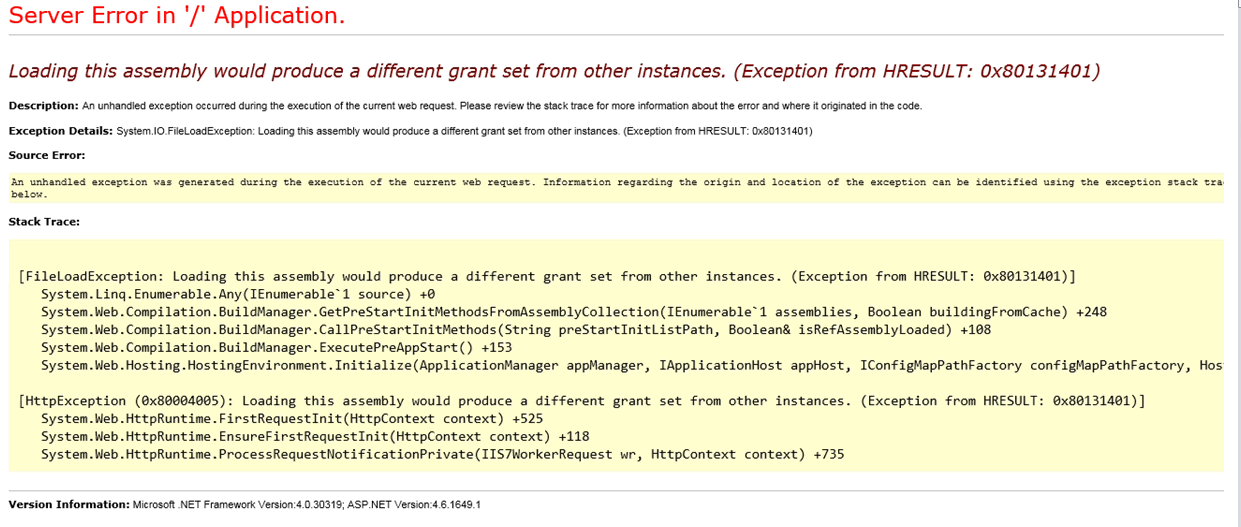
Loading this assembly would produce a different grant set from other instances. (Exception from HRESULT: 0x80131401)

Loading this assembly would produce a different grant set from other instances. (Exception from HRESULT: 0x80131401)


I did windows update and rebooted the SharePoint 2013 Server last week.  The SharePoint Sites are not working including central admin after reboot and got the below Warning Event log and error message when browsed the sites.

Event Log(Event id 1309)


Error Message:


Temporary Workaround Solution:

I changed the below entry in one of the web application web. Config file and the site was working fine.
From:
<trust level="Full" originUrl="" legacyCasModel="true" />
To:
<trust level="Full" originUrl="" legacyCasModel="false" />

Cause for the issue:
The SCOM 2016 Agent installed with APM feature on Sharepoint 2013 Server which caused the issue.
The client side .Net Application Performance Monitoring (APM) is not supported in SharePoint. That’s the reason we got the above error message.

Permanent Solution:
We reinstalled SCOM 2016 agent without APM feature through command. The issue was resolved and the sites were working fine after installation of SCOM 2016 Agent without APM Feature.
Used below Command Prompt for SCOM 2016 Agent without APM Feature installation.
MSIEXEC /i MOMAgent.msi NOAPM=1

Monday, July 3, 2017

The Subscription Settings Service and Corresponding Application and Proxy needs to be running in order to make changes to these settings


I got “The Subscription Settings Service and Corresponding Application and Proxy needs to be running in order to make changes to these settings” after I did the Apps Configuration on one of the SharePoint 2013 server.


Finally found that I skipped one of the Subscription Settings configurations in the steps. I ran the below commands to configure Subscription Settings Service

$account = Get-SPManagedAccount "domain Name \ service Account"
$appPoolSubSvc = New-SPServiceApplicationPool -Name “Name of Settings Service AppPool” -Account $account
$appSubSvc = New-SPSubscriptionSettingsServiceApplication -ApplicationPool $appPoolSubSvc -Name “Name of Settings Service Application” -DatabaseName “Name of Subscription Settings Service DB”
$proxySubSvc = New-SPSubscriptionSettingsServiceApplicationProxy -ServiceApplication $appSubSvc