Pages

Tuesday, August 22, 2017

Loading this assembly would produce a different grant set from other instances. (Exception from HRESULT: 0x80131401)

Loading this assembly would produce a different grant set from other instances. (Exception from HRESULT: 0x80131401)


I did windows update and rebooted the SharePoint 2013 Server last week.  The SharePoint Sites are not working including central admin after reboot and got the below Warning Event log and error message when browsed the sites.

Event Log(Event id 1309)


Error Message:
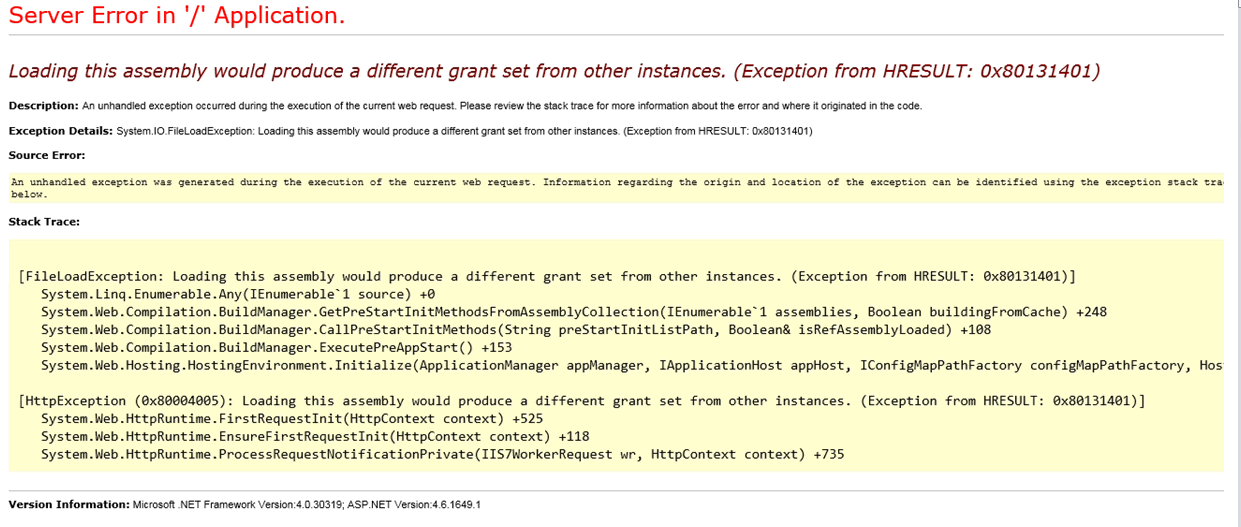


Temporary Workaround Solution:

I changed the below entry in one of the web application web. Config file and the site was working fine.
From:
<trust level="Full" originUrl="" legacyCasModel="true" />
To:
<trust level="Full" originUrl="" legacyCasModel="false" />

Cause for the issue:
The SCOM 2016 Agent installed with APM feature on Sharepoint 2013 Server which caused the issue.
The client side .Net Application Performance Monitoring (APM) is not supported in SharePoint. That’s the reason we got the above error message.

Permanent Solution:
We reinstalled SCOM 2016 agent without APM feature through command. The issue was resolved and the sites were working fine after installation of SCOM 2016 Agent without APM Feature.
Used below Command Prompt for SCOM 2016 Agent without APM Feature installation.
MSIEXEC /i MOMAgent.msi NOAPM=1

Monday, July 3, 2017

The Subscription Settings Service and Corresponding Application and Proxy needs to be running in order to make changes to these settings


I got “The Subscription Settings Service and Corresponding Application and Proxy needs to be running in order to make changes to these settings” after I did the Apps Configuration on one of the SharePoint 2013 server.


Finally found that I skipped one of the Subscription Settings configurations in the steps. I ran the below commands to configure Subscription Settings Service

$account = Get-SPManagedAccount "domain Name \ service Account"
$appPoolSubSvc = New-SPServiceApplicationPool -Name “Name of Settings Service AppPool” -Account $account
$appSubSvc = New-SPSubscriptionSettingsServiceApplication -ApplicationPool $appPoolSubSvc -Name “Name of Settings Service Application” -DatabaseName “Name of Subscription Settings Service DB”
$proxySubSvc = New-SPSubscriptionSettingsServiceApplicationProxy -ServiceApplication $appSubSvc

Thursday, June 22, 2017

Another object in this farm already contains the same ID


Cannot attach databases with same ID to different web applications

Databases with same internal ID cannot be attached web applications even if the databases have different name. If we try attach the database with same id, we would be get “another object in this farm already contains the same ID” as shown in below image.


We ran below commands to find and delete the database 

Get-SPDatabase | where{$_.Name -eq "webappliction Name"}
Remove-SPcontentdatabase –identity “ID of the DB”

The database attached successfully after we removed the existing database.

Cannot connect to the configuration database

When I open SharePoint Central admin and Application Portal got the following Message “Cannot connect to the configuration database


I checked and confirmed the below are looks good as per Microsoft link but the issue is exist.
  •        SQL Services are up and Running
  •        The SharePoint and SQL Server are talking together
  •        Nothing Database in Suspect Mode
  •        No Port Blocking in Firewall
  •        SharePoint Account had proper Permission in SQL


Finally found that the Application Pool account was locked due to some reason which caused the “Cannot connect to the configuration database” issue.


The Central admin and Application Portals are working fine after the Application Pool account unlocked for my incident.

Tuesday, June 20, 2017

Event ID 6801 - FIMSynchronizationService

Issue:

The AD Manager Property Value are not synced with SharePoint 2010 though SP UPS Service configured properly and got the below Event log messages

Event Id 6801 - FIMSynchronizationService “More than one DN Specified for the Same Profile”


Event ID 6801- FIM Synchronization Service “ Exception while trying to Migrate user  test\ramu  to thetest\ramu, The user does not exist or not unique”


Cause:

The NETBIOS (test\ramu) is different from Domain Name (thetest\ramu) which caused the issue.

Resolution:

The default configuration of the User Profile Service Application does not include the NetBIOS namespace.

The User Profile Service application setting has been changed by ran the below commands

$UPA = Get-SPServiceApplication –id “User Profile Service Application ID”
$UPA.NetBIOSDomainNamesEnabled=1
$UPA.Update()

Thursday, June 1, 2017

No Help Collection was found and unfortunately help seems to be broken in SharePoint 2016

No Help Collection was found and unfortunately help seems to be broken in SharePoint 2016

I got “No Help Collection was found” in Help Setting Page, also I got “Unfortunately Help Seems to be Broken” Message when Navigated to Help Page in SharePoint 2016 Site.

The issue has been resolve after the Help collection installed in the Server. Run the below commands for installation and verification.

Install-SPHelpCollection –All

Get-Sphelpcollection


Note: The installation of Helpcollection will take 5 to 10mins. Please Run Get-Sphelpcollection Command after installation.

Wednesday, May 3, 2017

Sharepoint 2013 Incoming Email Mails were stucked on SMTP Drop Folder

SharePoint Incoming Email Service Not Pickup the Mails from Drop folder

I have upgraded the Windows SharePoint Service 3.0(Standalone) which had incoming Email Service to SharePoint 2013 Server (Multi-farm Environment).

The upgrade was successfully completed and I configured the Incoming Email service based on the Microsoft Article but the mails were not picked from SMTP Drop folder to SharePoint.

I reconfigured many times but it was not solved. Finally I have followed the below article which resolved the issue and all the mails were picked from SMTP drop folder to SharePoint